FIRST CONTACT / AWARENESS #
FAQs #
• What is ShareWiFi
• How does it work?
PRODUCT INTRODUCTION #
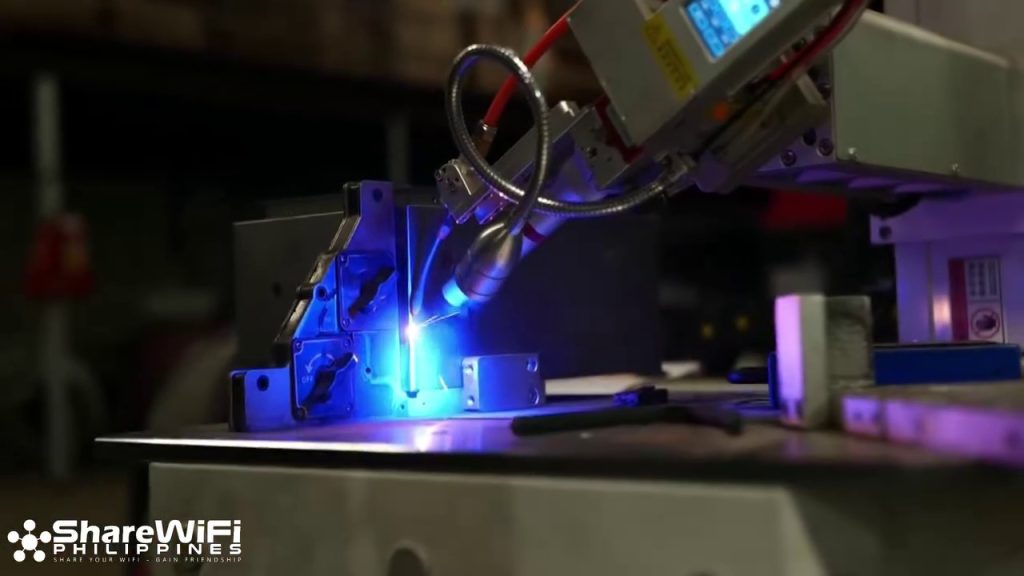
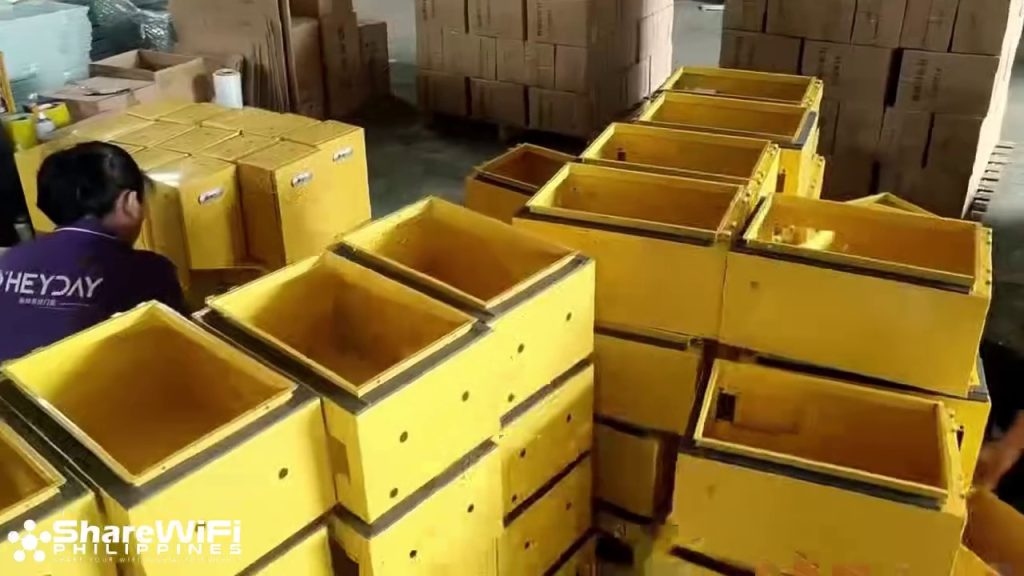
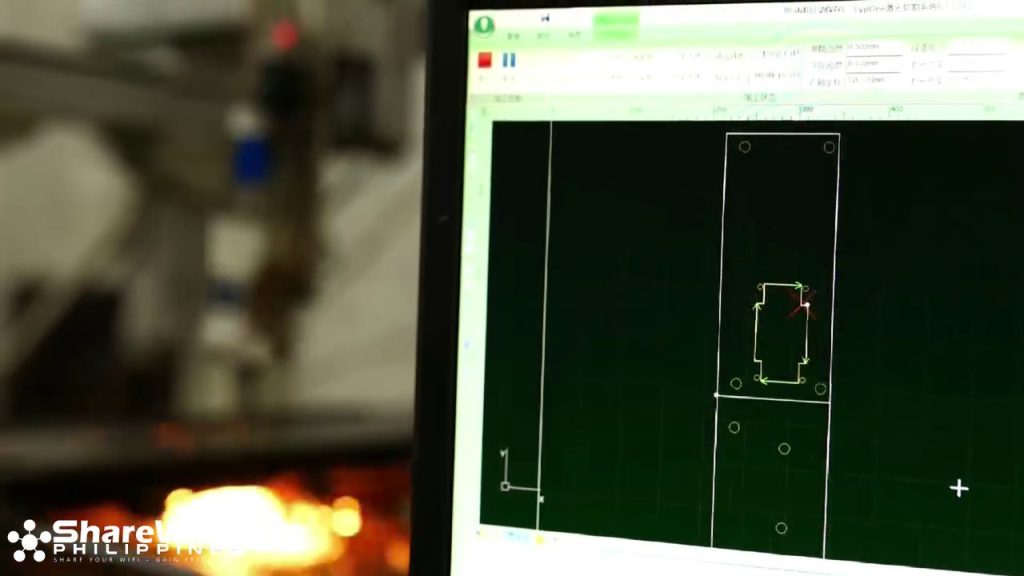
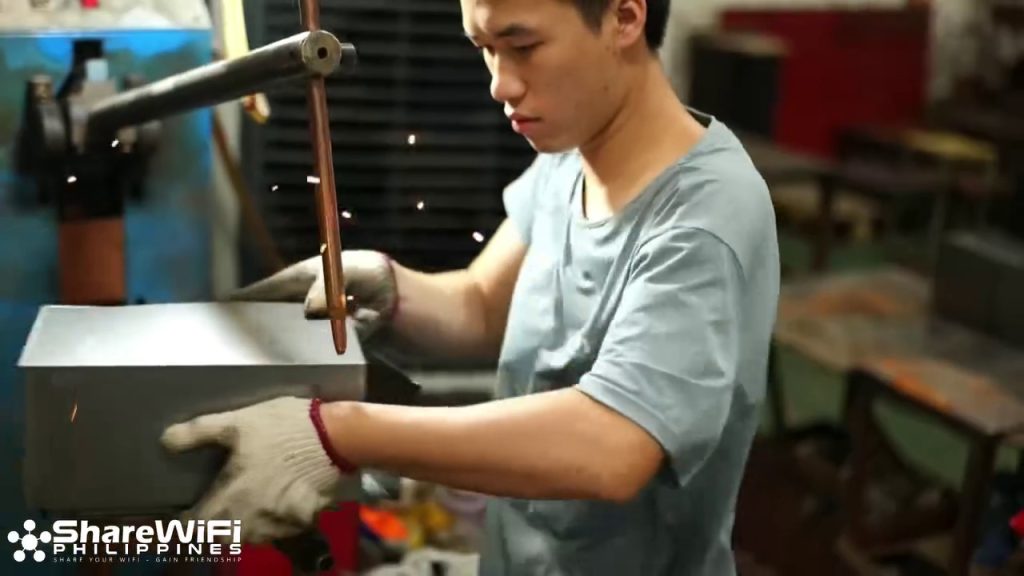
ShareWiFi is a technology company that designs and manufactures its own software and hardware in-house. From system development to hardware production and testing, all core components are developed internally to ensure quality, stability, and long-term support.
Video Links:
Inside ShareWiFi: In-House Hardware Manufacturing Process
https://www.facebook.com/reel/1272258150809400
ShareWiFi Factory Tour: How Our Hardware Is Built
https://www.facebook.com/reel/4805308913028378
From Design to Production: ShareWiFi Hardware Manufacturing
https://www.facebook.com/reel/1470516264382853
ShareWiFi is a coin-operated WiFi machine that allows people to sell internet access. Users can connect by paying small amounts, either through coins or cashless payments (₱1, ₱5, ₱10, and more). The machine owner earns income based on how much the WiFi is used.
In simpler terms, ShareWiFi is a Piso WiFi system.
Why ShareWiFi Is an Industry Leader #
ShareWiFi stands apart from other Piso WiFi providers through its unmatched level of control, accountability, and long-term commitment to customers.
First, ShareWiFi is the only Piso WiFi provider that designs and manufactures both its software and hardware in-house. This full vertical integration allows us to maintain strict quality control, ensure system stability, and continuously improve our products without relying on third-party vendors.
Second, we are the only provider that offers a one-year warranty covering all core components of the entire unit. Because we build the hardware ourselves, we can confidently support and replace essential parts when needed, giving customers true peace of mind.
Third, ShareWiFi is the only Piso WiFi company that uses a formal ticketing system to guarantee after-sales support. Every customer concern is recorded, tracked, and responded to, ensuring that no issue is ignored and every customer receives proper technical assistance.
Fourth, we are the only provider that offers installment payment options through a simple and accessible process. Customers can start their business with minimal upfront cost, without complicated requirements or lengthy approvals.
Finally, ShareWiFi is the only Piso WiFi brand that originated in the Philippines and successfully expanded to the global market. Today, ShareWiFi units are actively used not only locally but also internationally, proving that our technology, support system, and business model meet global standards.
COMPANY INTRODUCTION #
Who is ShareWiFi Philippines #
We are the manufacturer and seller of the new evolution of Piso WiFi vending machines in the Philippines. Our innovative devices are designed to help small business owners, shopkeepers, and entrepreneurs earn extra income by providing affordable internet access to their communities.
PRODUCT OVERVIEW #
FAQs #
• Packages Offered
• What parts are included in the package?
• Do you have an installment payment option?
• How much?
PACKAGES OFFERED, INCLUSIONS, HOW MUCH, SHIPPING COST, PAYMENT TERMS #
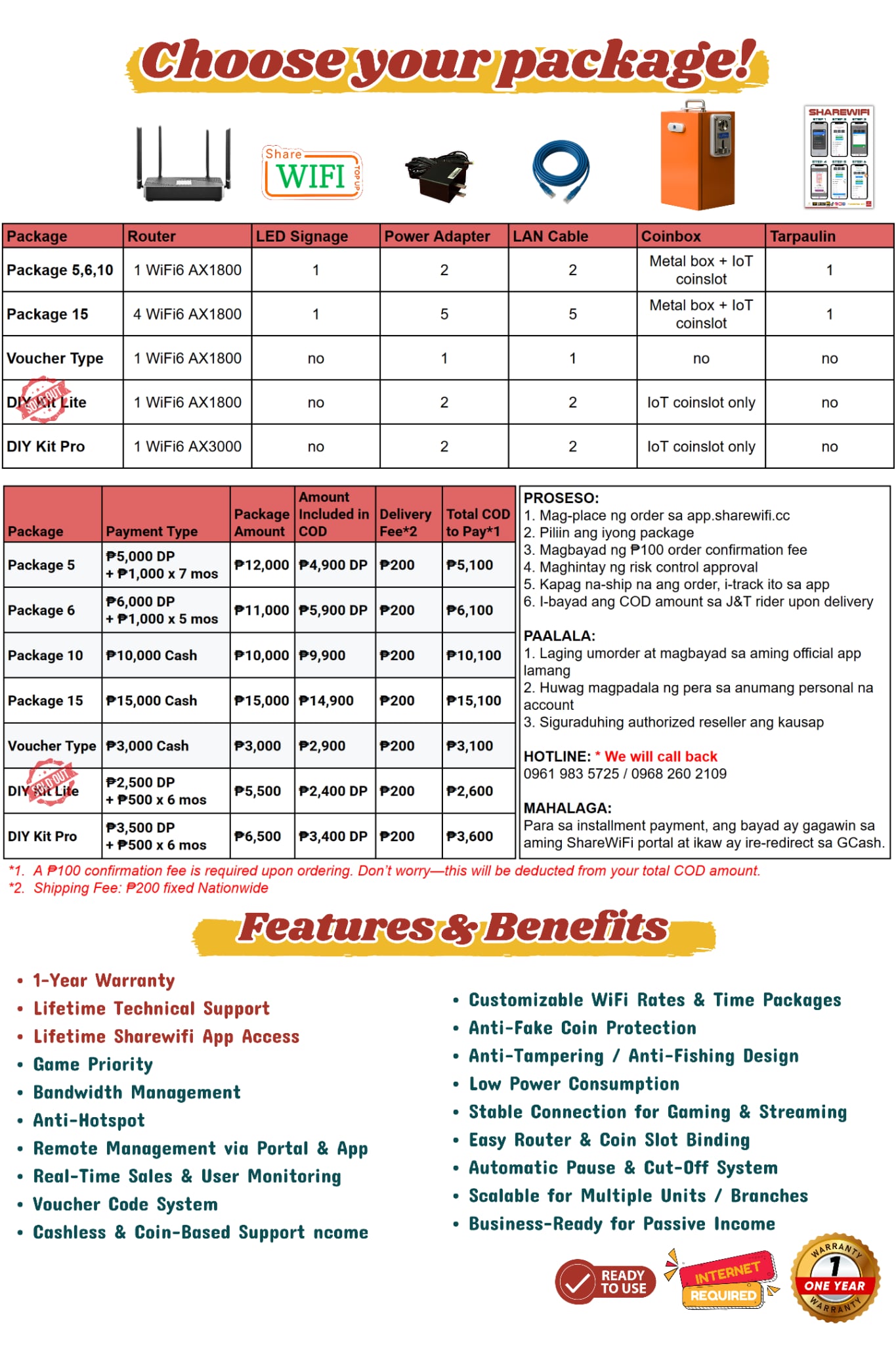
✅ Installment payment option available
Iron Box Design, Features & Installation Notes #
The ShareWiFi iron box is engineered for durability, ease of installation, and long-term indoor operation. It is constructed with a reinforced metal body and includes an integrated carrying handle, allowing for safe handling, easier positioning, and faster deployment during installation.
Latch & Access Mechanism #
The iron box is equipped with a secure latch system designed for quick access during maintenance or setup. To open the unit, align the latch correctly and lift the cover smoothly—no special tools are required. This design ensures convenient access while maintaining structural stability.
Adjustable Cable Entry Points (“Dark Holes”) #
The enclosure features pre-marked cable entry points, referred to as “dark holes.” These can be selectively opened based on the installer’s wiring requirements, allowing flexible cable routing while maintaining a clean and organized internal layout. Unused entry points remain sealed to help protect internal components.
Protective Coating & Finish #
The iron box is finished with a high-visibility, vibrant coating that is both rust-resistant and wear-resistant. This protective layer enhances durability in humid indoor environments and helps maintain a professional appearance over extended periods of use.
Physical Dimensions #
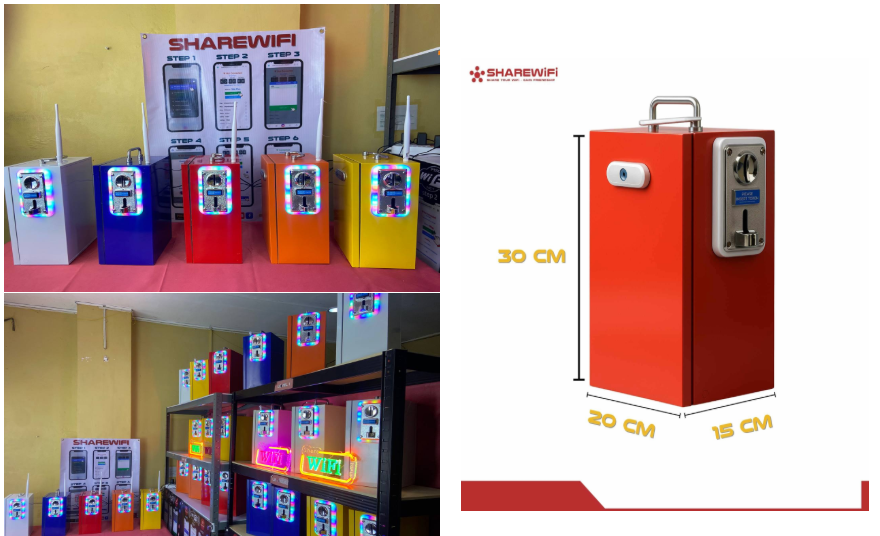
The iron box is manufactured with standardized dimensions to ensure compatibility with common installation locations:
Installation & Security Guidelines
This iron box is designed strictly for indoor or semi-protected installations. It is not burglar-proof and should not be exposed to unsecured outdoor environments. The recommended installation location is inside a window, kiosk, or other controlled area.
If outdoor placement is required (such as outside a window), an additional external iron cage or protective enclosure must be installed to enhance security and prevent unauthorized access or theft.
Product Photos and Coinbox Size #
• Can I see photos of your product?
• Coinbox size
Comparison with Traditional Piso WiFi #
• What is the difference between ShareWiFi and traditional Piso WiFi?
• Why is ShareWiFi better compared to traditional Piso WiFi?
ShareWiFi Product Overview #
KEY TECHNOLOGY & HARDWARE ADVANTAGES #
(Sales personnel are required to understand and memorize this section)
Router Source & Quality Assurance Notice #
Some ShareWiFi routers are sourced from telecom-grade devices originally used by network operators. These units are carefully selected and then re-engineered, optimized, and customized with ShareWiFi’s proprietary software to meet our system requirements.
Before deployment, each unit undergoes strict quality control, testing, and system integration to ensure:
- Stable and consistent performance
- Full compatibility with the ShareWiFi system
- Reliable long-term operation for commercial use
While these devices may originate from telecom sources, they are not used “as-is.” Each unit is professionally processed and upgraded to meet ShareWiFi’s performance standards.
As a result, the final product delivers performance, stability, and reliability that meet or exceed typical consumer-grade routers, making it suitable for continuous operation in business environments.
This approach allows ShareWiFi to maintain a balance between cost efficiency and high-quality performance, while ensuring that all users receive a dependable system.
Router Technology (WiFi Distribution Device) #
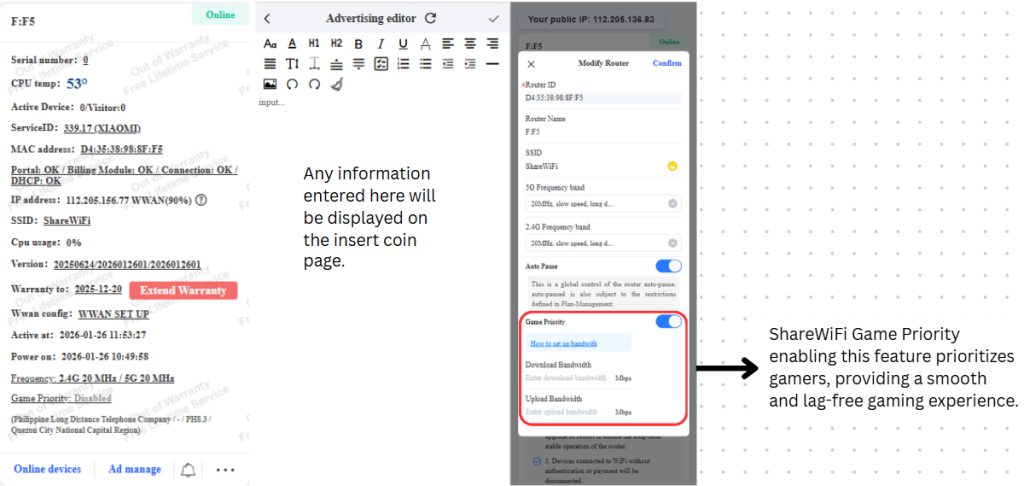
• The ShareWiFi router supports Wi-Fi 6 technology, delivering faster speed, better stability, and improved performance even with many users connected at the same time.
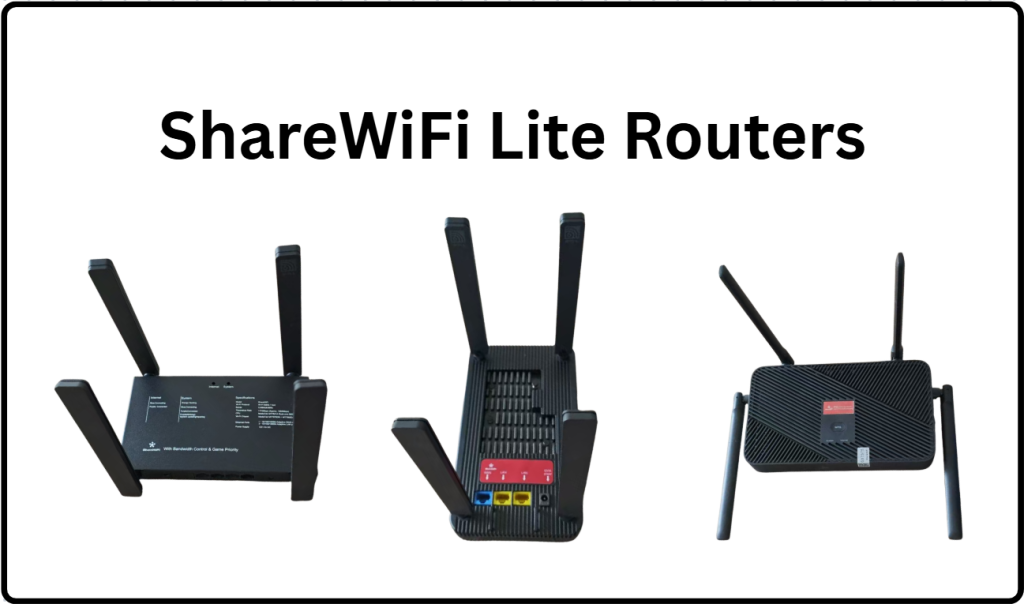
• The router supports different maximum wireless speeds depending on the package:
- Up to 1800 Mbps – ShareWiFi Lite
- Up to 3000 Mbps – ShareWiFi Pro
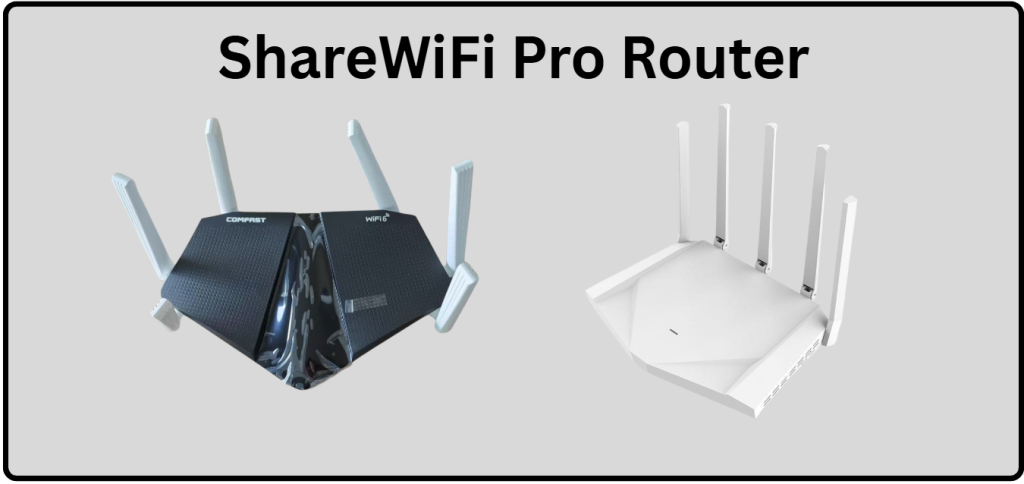
We sent a different brand randomly for Lite and Pro orders, but please don’t worry, the hardware performance and quality are the same and fully reliable.
• The router supports dual-band operation, working on both 2.4 GHz and 5 GHz frequencies:
- 2.4 GHz provides wider coverage and stronger signal penetration
- 5 GHz delivers faster speed and lower latency, ideal for streaming and online gaming
• The router is designed for low power consumption, helping reduce electricity costs while operating continuously for long hours.
Wireless Internet Connection (Clean & Flexible Setup) #
ShareWiFi supports wireless internet connection to the ISP router. This means the ShareWiFi router can connect to your existing internet source via WiFi, without requiring a physical LAN cable.
Because of this wireless connection capability:
• Installation is clean and clutter-free, with fewer visible cables
• No need to run long LAN cables across walls or ceilings
• Ideal for locations where wiring is difficult or not allowed
• Setup is faster and more flexible, especially for temporary or remote installations
Once connected wirelessly to the ISP router, ShareWiFi redistributes the internet to users through its own WiFi network while maintaining full system control, monitoring, and management features.
This wireless ISP connection option makes ShareWiFi more convenient compared to traditional Piso WiFi systems that rely strictly on wired connections.
Smart Coin-Operated Machine (IoT Coin Slot System) #
• The ShareWiFi coin-operated machine is a smart, network-connected (IoT) device, not a basic mechanical coin slot.
• Through the mobile app, the owner can:
- Check the coin error rate
- Perform intuitive coin calibration directly from the phone
- Monitor whether coin sensors are functioning properly
- Identify if sensors require cleaning or maintenance
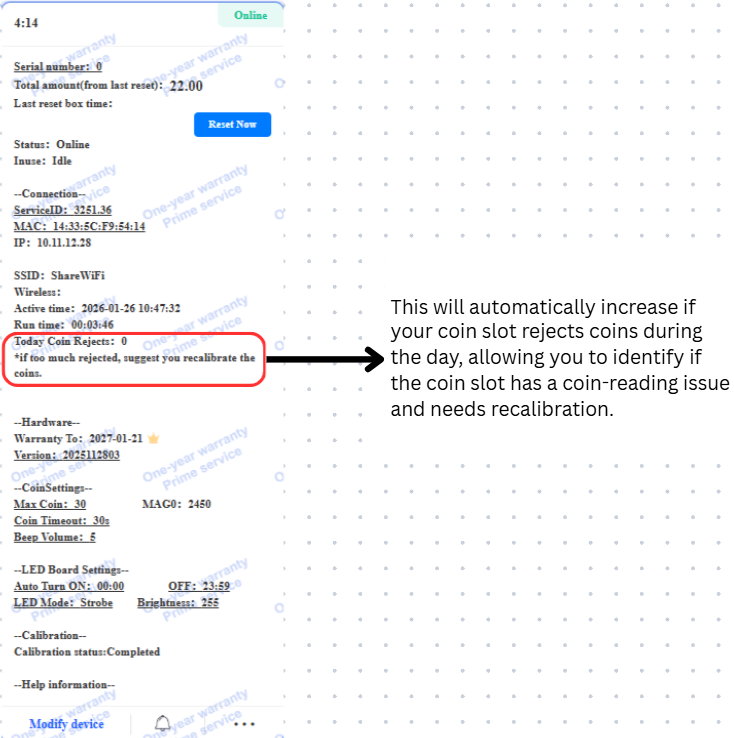
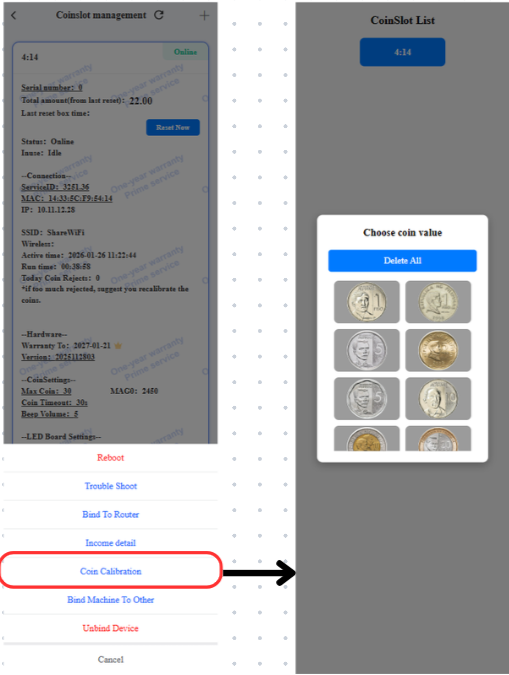
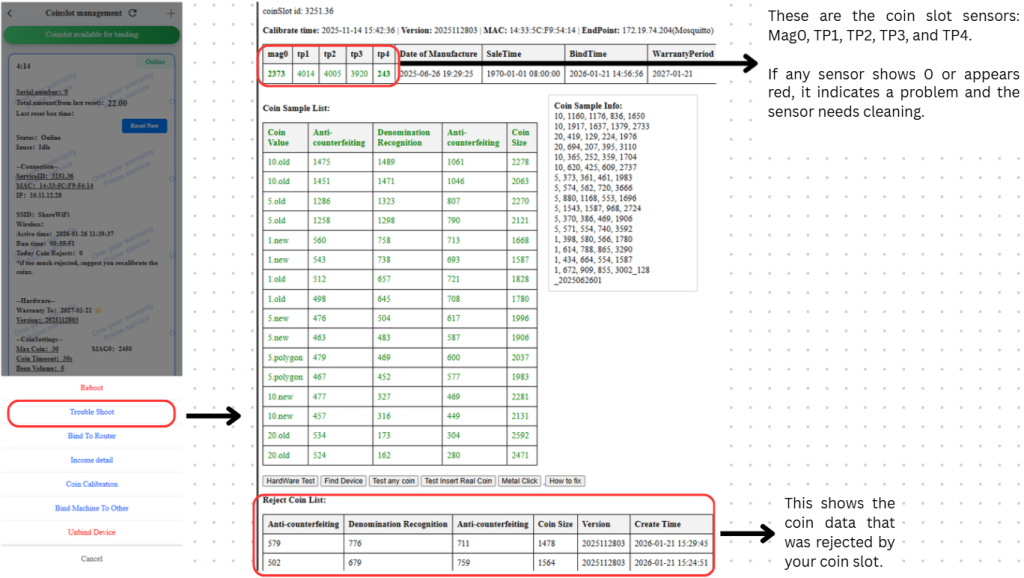
• This system helps prevent income loss caused by coin rejection or sensor malfunction.
• The device is designed with low power consumption and very low heat generation, eliminating the need for an additional cooling fan.
• Because there is no cooling fan:
- Dust accumulation is reduced
- The risk of internal damage is lower
- Overall device lifespan is improved
LED Neon Light (Marketing & Visibility Tool) #
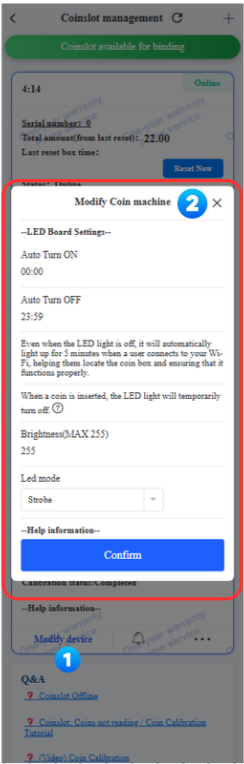
• The ShareWiFi LED neon light is remotely controllable through the mobile app.
• Using the app, owners can:
- Adjust the flashing frequency
- Set automatic on and off schedules
- Control operating hours to save electricity
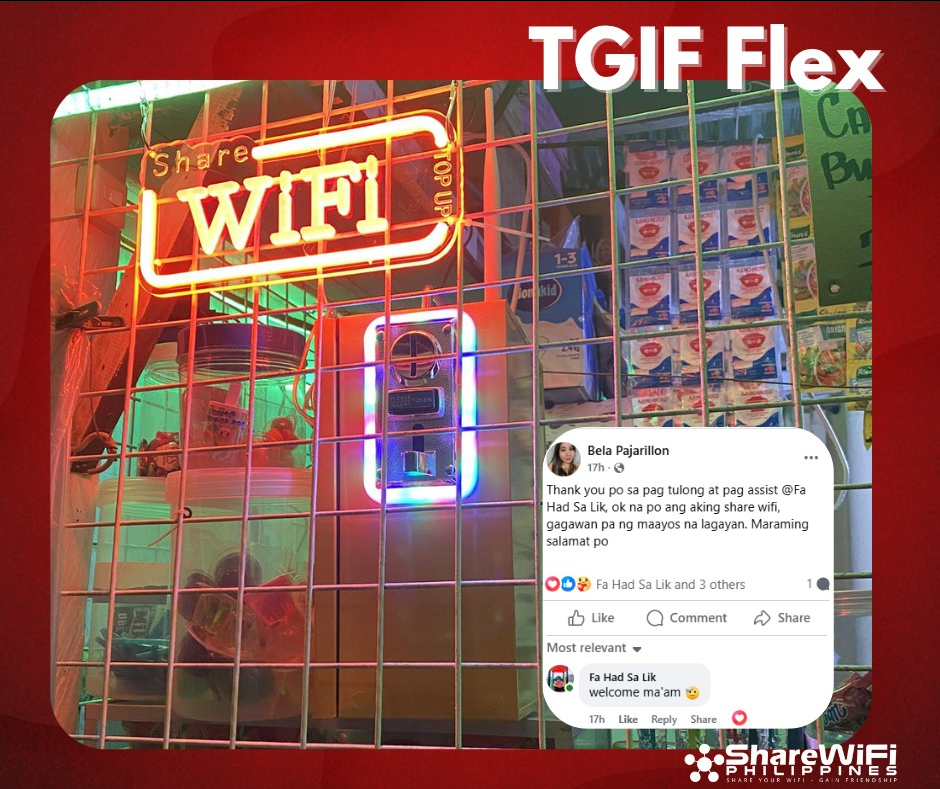
• The LED beads are highly vibrant and eye-catching, making the signage visible even from a distance.
• This neon light helps attract more customers and increases visibility, especially in high-traffic or roadside locations.
• The LED neon light is also designed for low power consumption.
TRUST & SCAM PREVENTION #
FAQs #
• Do you have an official group?
• Is ShareWiFi legit?
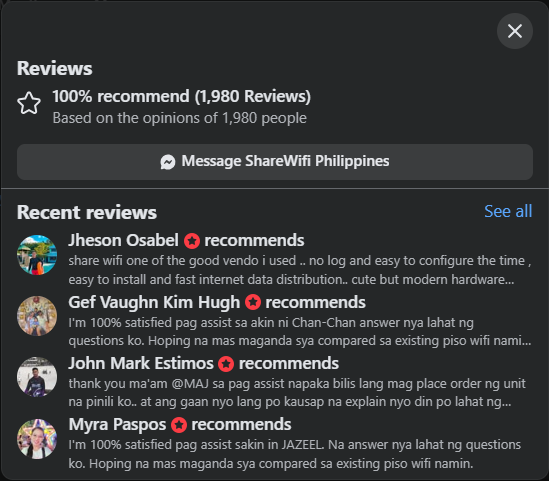
• Do you have real customer reviews?
• How do I know you are an official seller?
• How can I avoid scams?
Yes. ShareWiFi is a legitimate company and has never scammed any customer. Our commitment to good service and high-quality products has earned us positive feedback from more than 10,000 customers.
Because of our proven reliability, strong after-sales support, and consistent product quality, many well-known vloggers and content creators have voluntarily chosen to recommend ShareWiFi to their followers and fans. These recommendations are based on real experience and trust in the product, not forced or misleading promotions.
Our growing customer base, strong community presence, and public reviews reflect our long-term commitment to operating transparently and responsibly.
At the same time, ShareWiFi is a company with a strong sense of social responsibility. If a customer’s device is damaged due to a fire, we are willing to replace it with a brand-new unit at no cost to the customer.
In addition, if a customer’s income is affected by natural disasters or similar uncontrollable events, making it difficult to meet installment payments, ShareWiFi is willing to extend the payment deadline and provide flexible support.
These policies reflect our commitment to supporting our customers not only as a business, but as a long-term partner that understands real-life challenges.
Long-Term Vision & International Expansion #
ShareWiFi is a company with a clear long-term vision. Our products are no longer limited to the Philippines and have already expanded into international markets. Today, ShareWiFi units are actively used by customers in Indonesia, Africa, and Mexico, demonstrating that our system is reliable, scalable, and adaptable across different regions and network environments.
This international adoption reflects the strength of our technology, product quality, and after-sales support, allowing ShareWiFi to grow beyond a single local market.
To further support this, the guide will also include high-quality influencer and reviewer videos from Indonesia, showcasing real-world usage, setup, and performance of ShareWiFi units in international locations. These videos help customers see how ShareWiFi operates outside the Philippines and build additional confidence in the brand’s global credibility.
SHAREWIFI ONLINE CHANNELS
Official Facebook Page
https://www.facebook.com/sharewificompany
You may also join our Facebook community to connect with ShareWiFi owners, see real installations, and ask questions from people actively running the business. The community is supported by admin-verified moderators.
Official Facebook Group / Community
https://www.facebook.com/groups/sharewifiofficialph

Official Youtube Channel
https://www.youtube.com/@ShareWifiOfficial

After-Sales Support #
• Do you really provide after-sales support?
Yes. ShareWiFi has an equally advanced after-sales support system. Because we design and develop all core hardware components ourselves, we are able to provide a one-year warranty for all core hardware. If any hardware is damaged during normal use (excluding water damage, fire, physical casing damage, disassembly, lightning strikes, or similar external causes), you can easily obtain official technical support and hardware replacement directly from us. You will not lose contact with our team, and we will never block customers for any reason.
Warranty Policy:
https://doc.sharewifi.cc/index.php/docs/unit-warranty-policy/
SHIPPING & DELIVERY #
FAQs #
• Do you offer Cash on Delivery?
ShareWiFi offers Cash on Delivery (COD) as a payment option.
Nationwide Shipping #
• Do you ship nationwide?
Yes. ShareWiFi ships nationwide from Luzon to Mindanao.
Shipping fee: Php 200 nationwide
Delivery Time #
• How long is the delivery time?
Delivery lead time varies depending on location and order volume. Customers receive updates via text message, phone call, or email.
Normal delivery lead time:
NCR: 2–3 days
Luzon: 3–7 days
Visayas: 5–10 days
Mindanao: 7–14 days
Tracking Information #
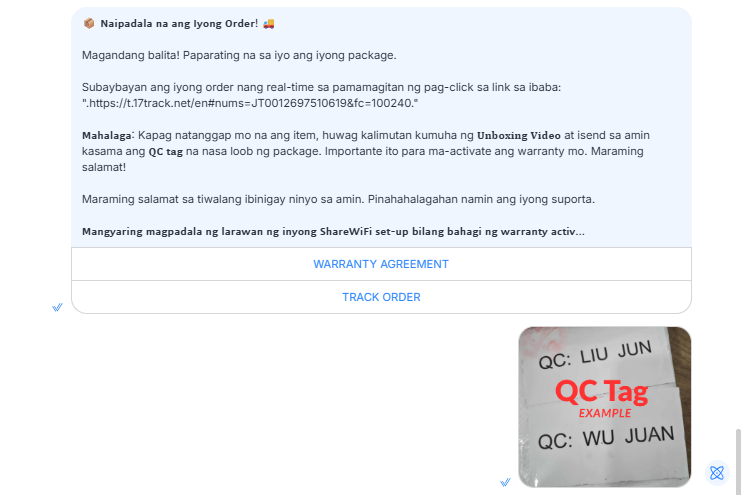
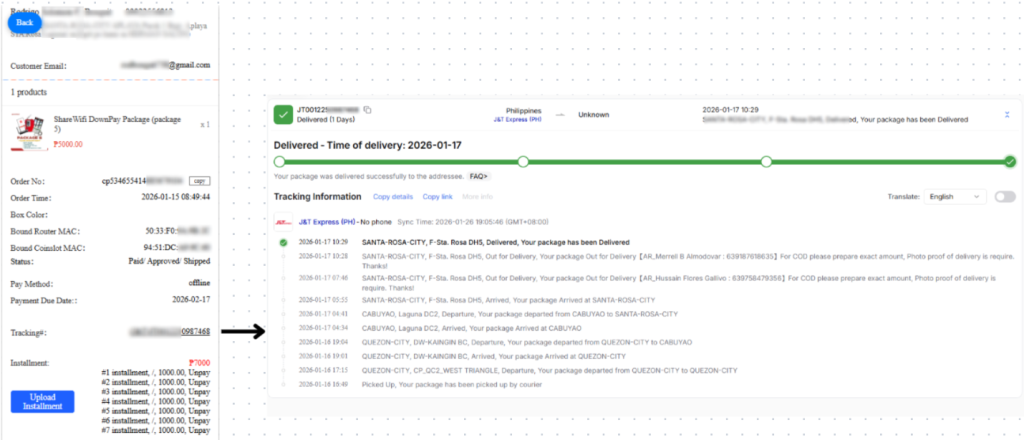
• Will I receive a tracking number?
Yes. Tracking details are sent via email or Messenger once the order has been shipped.
Packaging & Worldwide Delivery Protection #
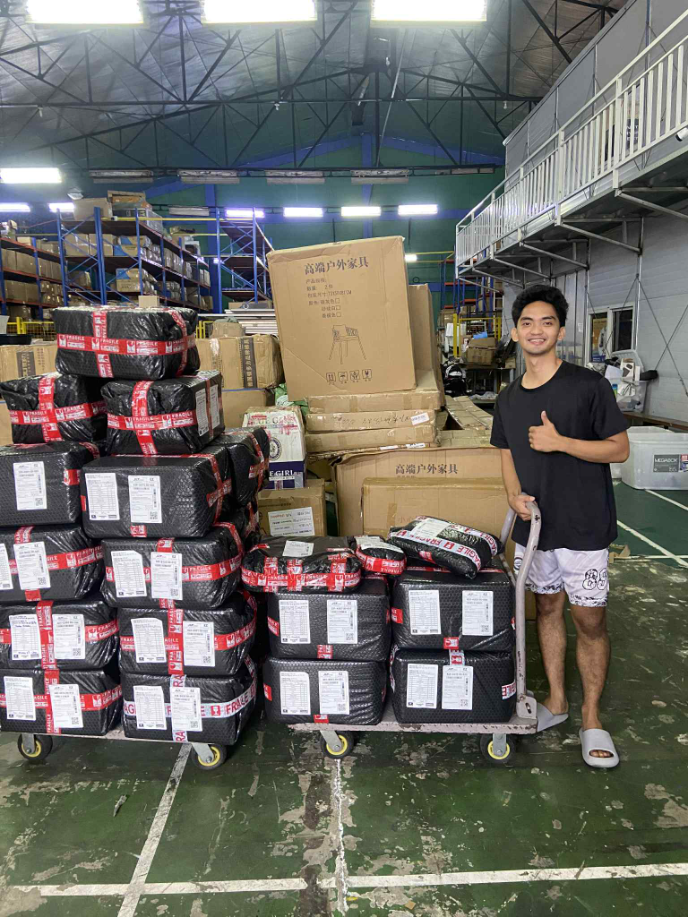
ShareWiFi is designed for worldwide delivery, not only local shipping. Because of this, every unit is professionally packed and well-protected to withstand long-distance transportation, handling, and international shipping conditions.
Each package is carefully secured to protect all components inside, ensuring that customers receive their units in good condition and complete upon arrival.
To help customers better understand what to expect, we also provide real unboxing videos showing:
- What the delivery package looks like
- How the unit is packed and protected
- What items are included inside the box
These unboxing videos allow customers to clearly see the packaging quality and contents even before placing an order, helping build confidence and transparency.
Packaging & Unboxing #
• Is the unit safely packed?
Yes. Each unit is securely packed. Customers are required to record an unboxing video upon receiving the unit. This is part of the warranty policy and helps with replacement or return requests.
WARRANTY & CUSTOMER SUPPORT #
FAQs #
• Do you have a warranty policy?
• How long is the warranty?
• What does the warranty cover?
• How does the replacement process work?
• How do I contact customer support?
• Do you offer lifetime technical support?
ShareWiFi Warranty and Support Policy #
• 10-Day Money-Back Guarantee
• 1-Year Limited Warranty
• Unboxing video required to activate warranty
• Lifetime Technical Support
• Refund and Return Policy
Full policy details:
https://doc.sharewifi.cc/index.php/docs/unit-warranty-policy/
Ways to Reach Our Team #
• Message the official Facebook page
• Click “Talk to human support” on ShareWiFi Philippines Facebook page
• Join the official ShareWiFi owners chat group
- Browser: https://www.messenger.com/cm/AbbhdJI8JoNHuSJ3/
- Mobile: https://m.me/cm/AbbhdJI8JoNHuSJ3/
• Use the ShareWiFi portal/app and create a customer support ticket

INSTALLATION & SETUP #
FAQs #
• How is the installation?
• Do I need a technician?
• Do you provide installation guides or videos?
• How long does setup take?
ShareWiFi is designed for self-installation and follows a plug-and-play setup. No technical background is required.
Guides and Tutorials #
ShareWiFi Manual
https://doc.sharewifi.cc/index.php/docs/complete-guide-for-sharewifi-unit-setup/
Bind Router and Coin Slot (Manual)
https://tinyurl.com/236r4efd
Bind Router and Coin Slot (Video)
Remote assistance is available if needed.
INTERNET & TECHNICAL REQUIREMENTS #
• Do I need an internet connection?
• Where do I get internet service?
• What internet provider is recommended?
• What internet speed is recommended?
ShareWiFi requires an active internet connection to operate. The unit distributes internet access via WiFi while system management and monitoring rely on the internet.
Compatible Internet Providers #
PLDT
Globe
Converge
Starlink
Other local ISPs
Recommended Internet Speed #
Light usage / small area: at least 20 Mbps
Moderate usage: 30–50 Mbps
High traffic / gaming-heavy areas: 50 Mbps or higher
User Capacity #
• How many users can connect at the same time?
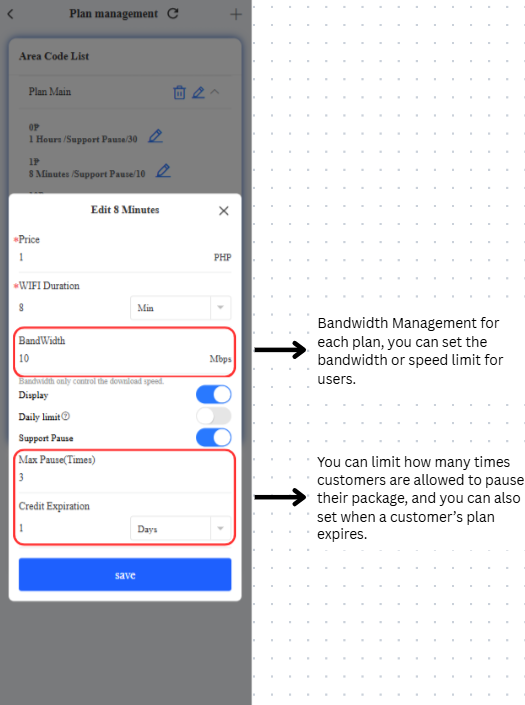
ShareWiFi supports multiple users simultaneously. The actual number depends on internet speed, bandwidth limits, and user activity.
Recommended AP / Extender Advisory (Important) #
To protect your ShareWiFi system performance and ensure correct billing, we strongly recommend using only WiFi extenders or Access Points (APs) that preserve each user’s original MAC address.
Some extenders/APs—especially when configured in Wireless AP Mode, may clone, mask, or modify MAC addresses (MAC NAT). This may work in a normal home setup, but it causes serious issues in the ShareWiFi system because ShareWiFi relies on every device’s unique MAC address for:
- User verification and authentication
- Session tracking and purchased time tracking
- Fair billing per user
- Fraud prevention and network protection
When an extender forces multiple users to appear as the same MAC address, it can result in login/authentication errors, incorrect billing, and system security triggers.
Automatic Detection & Blacklisting #
For network protection, ShareWiFi can automatically detect extenders/APs that mask MAC addresses and may blacklist them to prevent billing errors and abuse. A notification may also be sent to the account owner.
Recommendation #
✅ Use only extenders/APs that keep the original MAC address of each connected device.
❌ Avoid extenders/APs that MAC-clone / MAC-mask / MAC-modify, especially in Wireless AP Mode.
Confirmed incompatible extender: TP-Link RE550 (list is not yet complete and may be updated).
If you’re unsure whether your extender/AP is compatible, please contact ShareWiFi Support before purchasing or installing to avoid setup issues.
BUSINESS-RELATED QUESTIONS #
Location #
• Where is the best location to install a ShareWiFi unit?
House
Sari-sari store
Computer shop / Piso WiFi area
Boarding house / Apartment
Near schools
Near terminals or roadside locations
Average Income #
• How much is the average daily or monthly income?
Php 3,000 – Php 6,000 per month
Disclaimer:
Income figures are based on the experience of the majority of ShareWiFi owners. Actual earnings may vary depending on location and usage.
Return on Investment (ROI) #
Typically, the return on investment is 6 to 12 months.
However, for customers who choose the installment payment option, the ROI can be significantly faster—as short as 1 to 2 months. This is because the initial down payment is only Php 5,000. For example, if a unit generates Php 2,500 per month, the initial investment can be recovered within just two months.
At present, based on our experience, this is one of the highest-return, legally operated small-scale investment businesses available.
Disclaimer:
Actual ROI may vary depending on location, pricing setup, usage, internet quality, and operating conditions.
FINAL / CLOSING QUESTIONS #
How do I place an order? #
OPTION 1: Self-Booking #
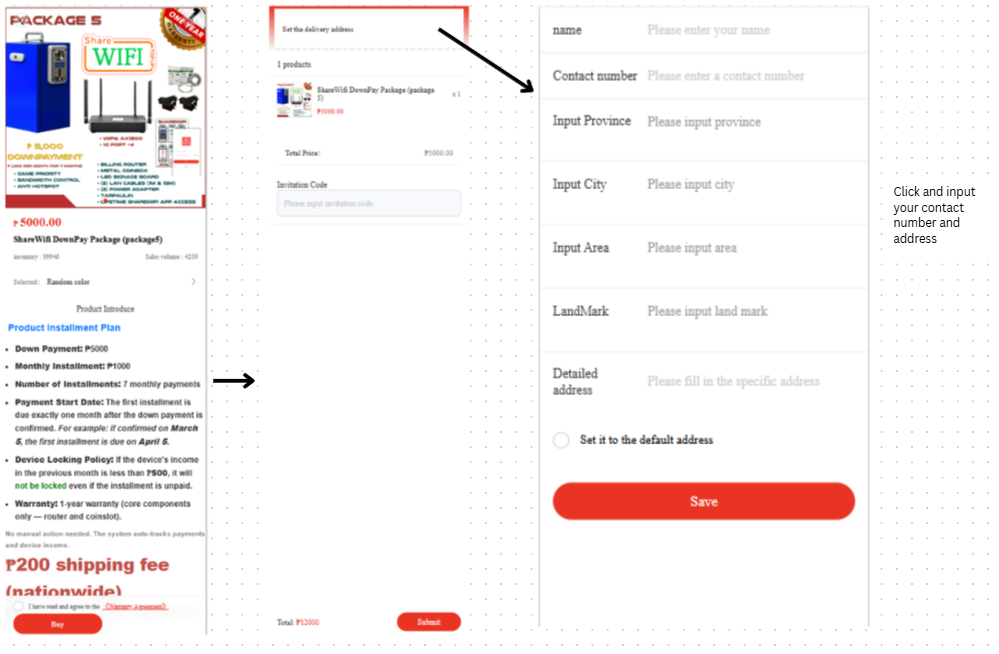
- Register at
https://app.sharewifi.cc - Select the package you’re interested
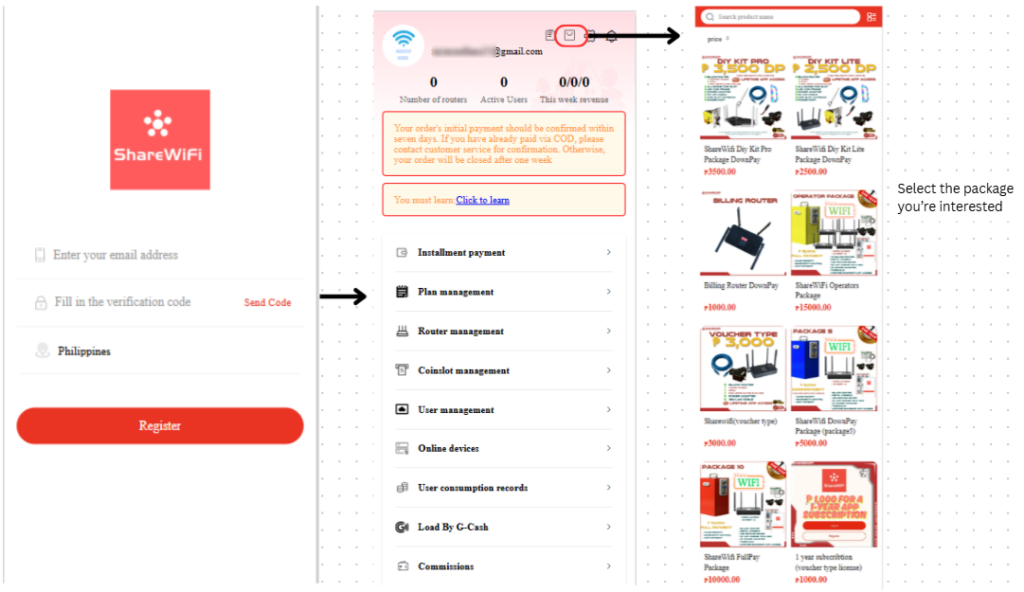
- Input your contact number and Address
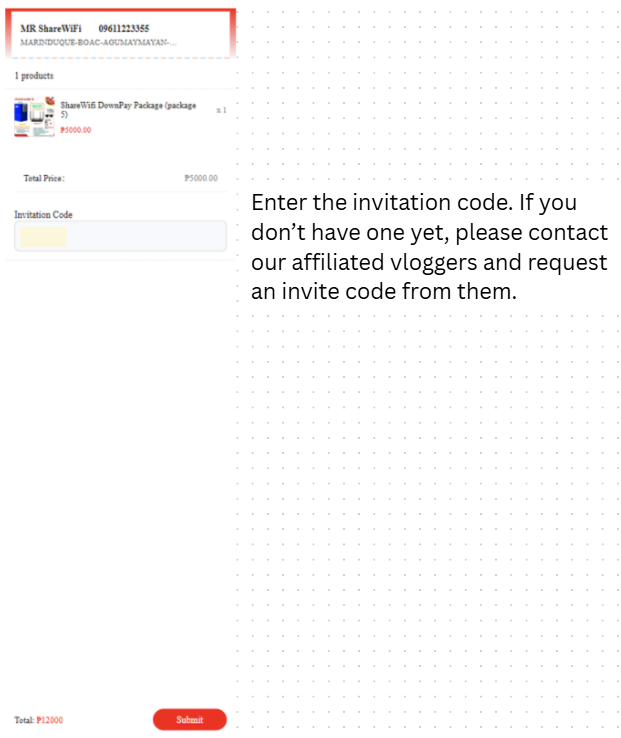
- Enter the invitation code. If you don’t have one yet, please contact our affiliated vloggers and request an invite code from them.
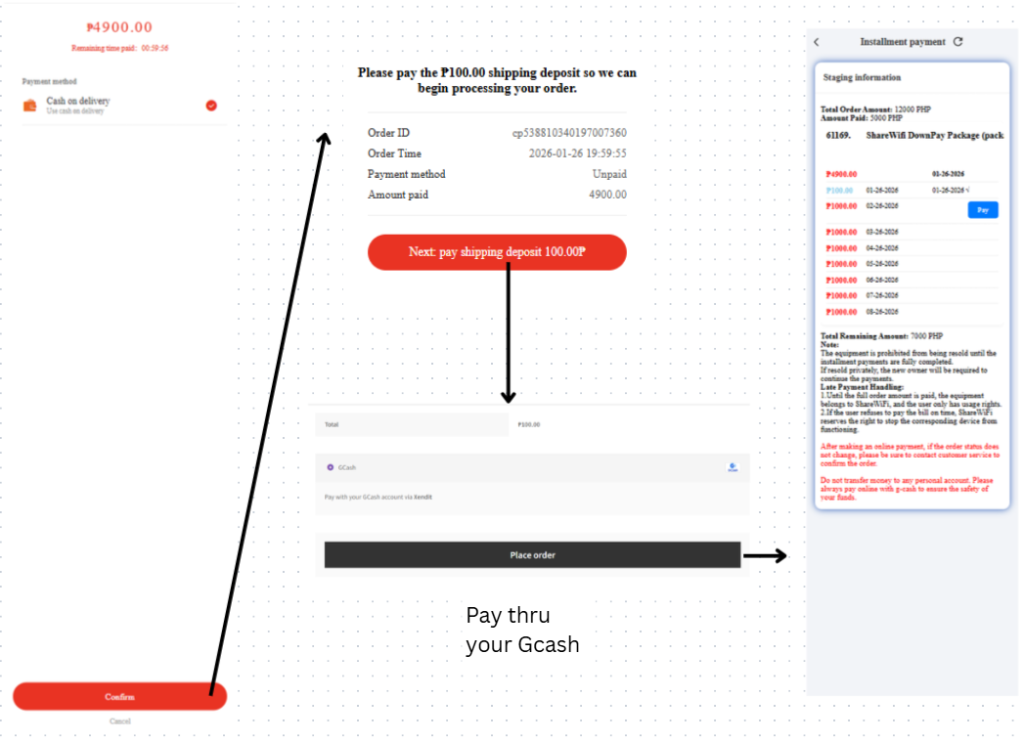
- Pay Php 100 to confirm the order
• Delivery fee: Php 200
• The Php 100 confirmation fee is deducted from the total price
OPTION 2: Talk to Sales Representatives #
Message the official ShareWiFi Philippines Facebook page and select “Talk to human support.”
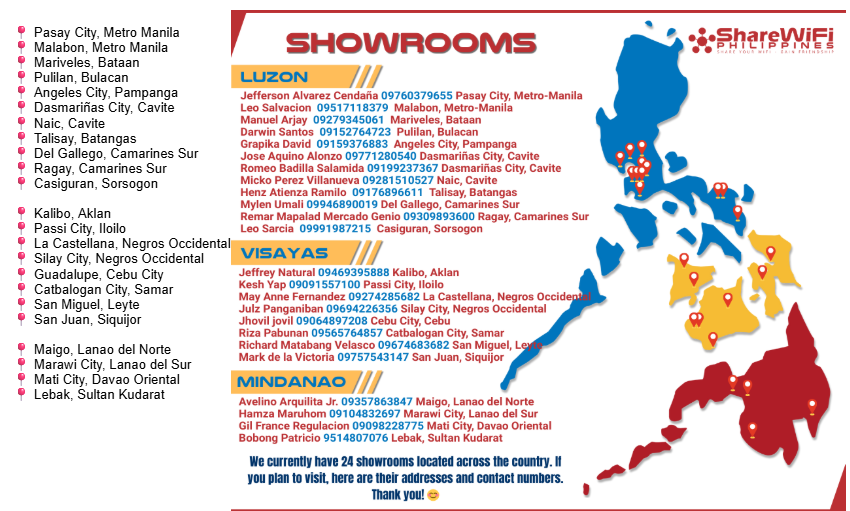
OPTION 3: Visit Showrooms #
Visit any authorized showroom.
Payment Options #
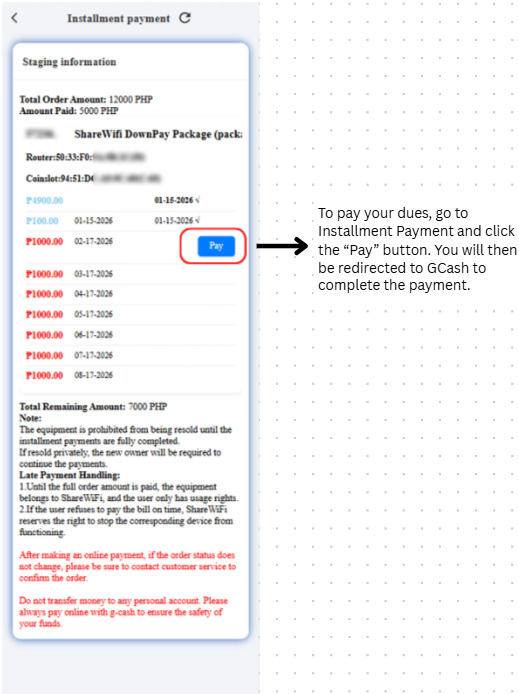
Monthly Installment Payment #
- Log in at
https://app.sharewifi.cc/pages/users/login/index - Go to the Installment tab
- Click PAY
- Complete payment via GCash
Payment guide:
https://doc.sharewifi.cc/index.php/docs/pay-order-installment-payments-thru-portal/
Other Videos You May Be Interested In #
To help you better understand the product, setup, and real-world usage of ShareWiFi, we have prepared additional video resources below. All links are official and regularly updated.
Unboxing Videos #
Watch real unboxing videos to see:
- How the ShareWiFi unit is packed
- What items are included inside the box
- The condition and protection of the unit upon delivery
👉 Watch here:
https://www.facebook.com/saved/?list_id=122199712766337292
Troubleshooting Videos #
These videos provide step-by-step guidance on common concerns, including:
- Initial setup issues
- Coin slot and router troubleshooting
- Connection and configuration checks
👉 Watch here:
https://www.facebook.com/saved/?list_id=122199713516337292
Vlogger Recommendations #
See honest reviews and demonstrations from trusted vloggers and content creators who have personally used ShareWiFi. These videos showcase:
- Real installations
- Actual performance
- Income and usage experience
👉 Watch here:
https://www.facebook.com/saved/?list_id=122199712598337292


